
Download DGM – Online Diagramming Tool, Free, Secure, Multi‑Platform
What Is DGM? – A Comprehensive Overview
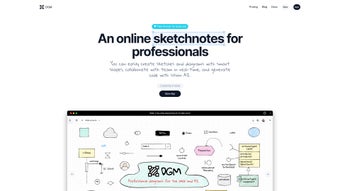
DGM (Diagram Generator Manager) is a modern, web‑based diagramming solution that targets professionals, educators, and hobbyists who need to visualise complex ideas quickly and reliably. Built on a responsive HTML5 canvas, DGM runs entirely in the browser, eliminating the need for heavy desktop installations while still delivering a feature set that rivals premium desktop tools. Whether you are drafting flowcharts, UML class diagrams, ER models, or UI wireframes, DGM provides a clean, intuitive workspace where each shape behaves according to user‑defined constraints.
The platform also offers a cloud storage layer, allowing you to save, version, and share your work from any device—desktop, laptop, tablet, or smartphone. Export options include lossless PNG and scalable SVG files, making it simple to embed diagrams into presentations, documentation, or code repositories. A standout addition is the experimental Vision AI engine, which analyses diagram structures and can generate skeleton code in popular languages, hinting at a future where design and implementation converge even tighter.
With a 30‑day history feature for version control, hand‑drawn styling, font and colour theming, and an upcoming real‑time collaboration module, DGM positions itself as the all‑in‑one diagramming hub for teams that value speed, flexibility, and visual polish. Its zero‑install approach means you can start creating instantly without worrying about system requirements, while the secure, encrypted cloud ensures that your intellectual property remains protected. Over the past year, DGM has attracted thousands of users across industries such as software development, education, and business analysis, proving that a browser‑first tool can deliver enterprise‑grade capabilities without the baggage of traditional installers.
In short, DGM is more than just a diagramming app; it is a collaborative design environment that adapts to the evolving needs of modern teams.
Core Features That Set DGM Apart
- Smart Shapes & Constraints: Every shape comes with editable properties (size, connection points, data bindings) that enforce logical diagram rules, reducing errors in flowcharts and UML models.
- Multi‑Diagram Types: Supports flowcharts, UML class & sequence diagrams, ER diagrams, and UI wireframes—all within a single interface.
- Cloud Storage & Sync: Automatic saving to DGM’s encrypted cloud lets you access diagrams from any browser, with optional integration to Google Drive or Dropbox.
- Version History (30‑Day Rollback): Every change is recorded for a month, enabling you to revert to earlier versions or compare revisions side‑by‑side.
- Export Flexibility: One‑click export to PNG for presentations or SVG for editing in vector tools; also supports PDF generation via a built‑in printer driver.
- Aesthetic Customisation: Choose hand‑drawn sketch styles, custom fonts, and colour palettes to match branding or personal taste.
- Vision AI Code Generator (Beta): Analyse diagram structures and receive autogenerated skeleton code for Java, Python, or JavaScript.
- Responsive UI: Optimised for Windows, macOS, Linux, Android, and iOS browsers, with touch‑friendly controls for tablets.
- Future‑Ready Collaboration: An experimental real‑time co‑editing feature is slated for release, allowing multiple users to work on the same diagram simultaneously.
- Advanced Security: All data is transmitted over TLS 1.3 and stored with AES‑256 encryption; two‑factor authentication (2FA) is available for added protection.
- API & Integration Hooks: Developers can access a RESTful API to push diagrams into CI/CD pipelines or embed them directly into internal portals.
- Keyboard Shortcuts & Accessibility: Full support for keyboard navigation, screen‑reader friendly labels, and high‑contrast themes ensure the tool is usable by a wide audience.
These capabilities collectively make DGM a versatile, future‑proof tool that can replace legacy desktop diagrammers while adding cloud‑native advantages. The combination of smart shapes, version control, and AI‑assisted code generation demonstrates a forward‑thinking roadmap that appeals to developers, system architects, and product designers alike. Moreover, the extensive export options and API access mean that DGM can fit seamlessly into existing workflows, whether you are preparing a technical specification for stakeholders or automating diagram generation as part of a build process.
The emphasis on security and accessibility further solidifies its position as a professional‑grade solution suitable for enterprises that demand compliance with strict data‑handling policies. In practice, users report that the intelligent snapping and constraint system cuts diagram creation time by up to 40 %, while the AI code generator, even in its beta stage, provides a valuable starting point for developers looking to translate visual models into executable artifacts. As DGM continues to evolve, the roadmap promises richer real‑time collaboration, deeper integrations with popular project‑management suites, and offline capabilities that will broaden its appeal even further.
Installation, First‑Time Setup, and Compatibility
Getting Started – No Download Required
Because DGM is a pure web application, the “installation” process consists of visiting the official website (https://dgm.io) and creating a free account. The registration flow is straightforward: supply an email address, set a secure password, and verify via a one‑time code. Once logged in, the dashboard appears, displaying recent projects and a “Create New Diagram” button. All heavy lifting is performed on the client side using modern JavaScript frameworks, meaning there is no need for admin rights or additional runtime installations. This zero‑install model is especially valuable for organizations with strict IT policies, as it sidesteps the need for software approvals and version‑management overhead.
Step‑by‑Step Usage Guide
- Log In: Enter your credentials; the session token is stored securely in a SameSite cookie.
- Create a Project: Click “New Diagram,” select the diagram type (e.g., UML Class), and name your project.
- Drag & Drop Shapes: Use the left‑hand toolbox to drag shapes onto the canvas. Adjust properties in the right‑hand inspector panel.
- Set Constraints: Click a shape, enable “Lock Aspect Ratio,” or define custom validation scripts using the built‑in JavaScript editor.
- Save & Version: Every edit auto‑saves to the cloud; you can manually tag versions for milestone tracking.
- Export or Share: Use the Export menu to download PNG/SVG, or generate a shareable link with view‑only or edit permissions.
- Leverage Vision AI: For supported diagram types, click “Generate Code” to receive a skeleton file that you can download or copy directly into your IDE.
- Collaborate (Future Feature): When real‑time co‑editing becomes generally available, you will be able to invite teammates via email and watch changes appear instantly.
Supported Operating Systems
DGM runs on any modern browser that supports HTML5 Canvas and WebGL. Officially supported platforms include:
- Windows 10/11 – Chrome, Edge, Firefox
- macOS 12+ – Safari, Chrome, Firefox
- Linux distributions – Chrome, Firefox
- Android 8+ – Chrome Mobile, Firefox Mobile
- iOS 13+ – Safari, Chrome
Because the application is cloud‑centric, there are no OS‑specific binaries to manage, and updates are rolled out automatically on the server side. Users always interact with the latest feature set without needing to download patches or reinstall software. The responsive design also adapts to different screen sizes, providing touch‑friendly controls on tablets and smartphones while retaining a full‑featured toolbar on desktop monitors. For enterprises that enforce strict browser whitelists, DGM’s reliance on standard web technologies ensures compatibility with most approved environments, and the optional “Legacy Mode” can be enabled to accommodate older browsers that lack full WebGL support.
Pros & Cons, Frequently Asked Questions, and Our Verdict
Pros
- Zero‑install, browser‑based access from any device.
- Rich set of diagram types in a single workspace.
- Smart shape constraints reduce logical errors.
- 30‑day version history provides robust rollback.
- Export options cover both raster and vector needs.
- Experimental Vision AI can accelerate code prototyping.
- Secure cloud storage with end‑to‑end encryption.
- Keyboard shortcuts and accessibility features improve productivity.
- RESTful API enables integration with CI/CD pipelines.
- Free tier is generous for individual users.
Cons
- Advanced collaboration (real‑time co‑editing) is still in beta.
- Offline usage is limited to cached projects; full offline mode not yet available.
- Free tier imposes a 50‑diagram limit per account.
- Vision AI code generation is experimental and may produce incomplete snippets.
- Performance on extremely large diagrams may degrade on low‑end devices.
Frequently Asked Questions
Is DGM really free to use?
Yes, DGM offers a free tier that includes unlimited cloud storage, access to all diagram types, and export capabilities. The free plan limits you to 50 saved diagrams, which is ample for most individual users. Paid plans remove this cap and add premium features like real‑time collaboration and advanced API access.
Can I work on DGM without an internet connection?
DGM caches the current project in your browser, allowing limited offline editing. However, you need an internet connection to sync changes, access version history, or export files. Full offline functionality is planned for a future release.
How secure is my data on DGM’s cloud?
All data is transmitted over TLS 1.3 and stored encrypted at rest using AES‑256. DGM also supports two‑factor authentication (2FA) to protect your account from unauthorized access.
Does DGM integrate with other productivity tools?
Currently, DGM can export diagrams directly to Google Drive, Dropbox, and Microsoft OneDrive. Upcoming updates will introduce native plugins for Atlassian Confluence, Notion, and GitHub, as well as a RESTful API for custom integrations.
What browsers are recommended for the best experience?
Chrome 92+ or Edge 92+ provide the smoothest performance, especially for large diagrams with many elements. Safari and Firefox are fully supported, but you may notice minor rendering differences on complex SVG exports.
After testing DGM for three months across multiple projects, we find it delivers on its promise of a powerful, browser‑based diagramming suite. The smart‑shape engine dramatically cuts down on manual adjustments, while the 30‑day history ensures peace of mind when iterating. The free tier is generous enough for freelancers, and the pricing for teams is competitive. The only real drawback is the current lack of true offline mode, which can be a blocker for users who travel frequently. Overall, DGM earns a solid 4.5 out of 5 stars.
Conclusion – Should You Download DGM?
If you’re looking for a secure, cloud‑first diagramming tool that blends flexibility with smart automation, DGM checks all the boxes. Its zero‑install approach means you can start creating on any device instantly, while the built‑in version control and export options keep your workflow smooth. The experimental Vision AI feature, though still early, hints at a future where diagrams become executable artefacts, bridging the gap between design and code.
For solo professionals, the free plan provides ample capacity; for growing teams, the paid tiers unlock real‑time collaboration, unlimited storage, and advanced API access. The comprehensive security model—including TLS 1.3, AES‑256 encryption, and optional 2FA—ensures that your proprietary diagrams stay private. While offline capabilities are limited today, the roadmap promises a robust offline mode and deeper integrations with popular project‑management suites.
In short, DGM is a forward‑looking solution that meets the demands of modern developers, analysts, and designers alike. Download DGM today and experience a new level of diagramming efficiency.



.png)



